

Kids ask questions all day. Why is the sky blue? How do volcanoes work? Many children now search for answers online, but the open web can show them ads, scary images, and adult content. Parents want a safer way for their kids to explore.
Kiddle for kids is a free, safe kids search engine built for young learners. It shows big pictures, simple results, and filtered content. In this guide, you will learn what Kiddle is, its key features, how it works, and whether it is right for your child in 2026.
What is the Kiddle Safe Visual Search Engine for Kids?
Kiddle is a free, child friendly search engine that shows large image results and filters out adult content. It helps kids search the web safely and find easy to read answers.
Kiddle looks different from a normal search page. It uses bright colors, big text, and large thumbnails. Children can spot the right result by looking at the picture first. This makes it a true visual search engine for young users.
Many parents think Kiddle is a Google product. It is not. Kiddle is an independent site. It uses Google Custom Search technology and Google SafeSearch filtering in the background. The Kiddle team adds its own layer of picks and rules on top.
Here is a quick look at Kiddle at a glance:
| Feature | Details |
| Type | Kid safe visual search engine |
| Cost | Free to use |
| Account needed | No |
| Main audience | Children, mostly ages 5 to 12 |
| Search types | Web, images, videos, and news |
| Filtering | Editor picks plus SafeSearch |
| Built in parental controls | No |
Kiddle is also popular in classrooms. Teachers use it for quick research tasks. Parents use it for homework help and safe browsing at home.
The Start and Evolution of Kiddle
Kiddle launched around 2014. The idea was simple. Kids needed a search tool that spoke their language. Regular search engines were built for adults. They showed long text, ads, and sometimes unsafe content. The first version of Kiddle was basic. It used a custom search setup and a clean, colorful design.
The big thumbnails and large fonts became its signature style. Children could read results without feeling lost. Over the years, Kiddle grew. The site added more search tabs and improved its picks of trusted pages. It also added a kid friendly encyclopedia section. This section explains topics in simple words, with short facts and clear pictures.
Kiddle also stayed true to one core idea. It does not ask kids to sign up. It does not build user profiles. This choice keeps the tool simple, and it appeals to parents who worry about children’s data.
How Does the Kiddle Search Engine for Kids Work?
Kiddle works by sending a child’s search to a filtered system. It then shows results in a ranked list. Editors pick the top results, trusted sites follow, and SafeSearch filters the rest.
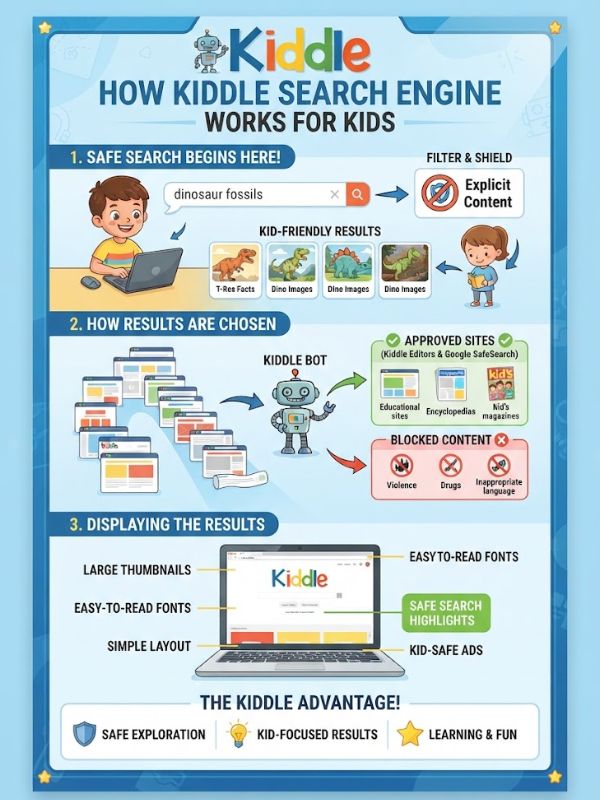
Here is the basic flow. A child types a word or phrase in the search bar. Kiddle checks the search against its filters. Then it shows results in a clean layout with large images and big titles.
Kiddle explains that it ranks results in three groups:
- Top results: These are handpicked by Kiddle editors. The pages are written for kids, so the language is simple.
- Middle results: These come from trusted sites. They are safe but may not be written only for children.
- Lower results: These are filtered by Google SafeSearch. They may use harder words and may not suit young readers.
This ranking matters. The best results sit at the top. A child who clicks the first few links gets the safest and easiest content. Kiddle also blocks many unsafe keywords. If a child types a risky term, the search may show no results or a warning.
This adds a second guard on top of SafeSearch. Here is a simple example. A child types “volcano.” Kiddle shows colorful pictures of volcanoes. The top links lead to kid friendly science pages.
The child can see, read, and learn without leaving a safe zone. Another example is homework help. A student types “water cycle.” Kiddle shows diagrams, short explanations, and videos. The student can pick what fits the lesson.
Is Kiddle Safe for Kids?
Kiddle is safer than a regular search engine, but no filter is perfect. It blocks most adult content, yet parents should still watch their child’s use.
Kiddle uses several safety layers. It uses SafeSearch, editor picks, and keyword blocks. It also states that it does not collect personal information from users. Children do not need to share a name, email, or age.
Still, safe does not mean risk free. Filters can miss things. A page might look fine in a search result and then link to something else. Ads on the page may also lead to outside sites.
Here are the main safety points to know:
- Kiddle blocks most adult and violent content.
- The lower results may include sites not made for children.
- Ads may appear, and a child might click one by accident.
- Clicking a result leaves Kiddle and opens another site.
- Kiddle cannot control what outside sites show.
Parents should treat Kiddle as a strong helper, not a full guard. The best safety plan mixes tools with talks. Teach your child what to do if something strange appears. A simple rule works well: “Close the page and tell me.”
Digital literacy matters too. Show your child how to spot ads. Explain why some pages are not true. Kids who understand these ideas stay safer on any website.
What Are the Best Ages to Use Kiddle for Kids?
Kiddle suits children from about 5 to 12 years old. Younger kids need an adult beside them. Teens will likely outgrow it.
Every child grows at a different pace. The age guide below is a starting point. Use it with your own judgment.
| Age Group | Skill Level | Kiddle Fit | Adult Support |
| 3–5 | Pre readers | Limited | Full support |
| 6–8 | Early readers | Good | Regular check ins |
| 9–11 | Confident readers | Very good | Light guidance |
| 12+ | Advanced readers | Limited | Open talks |
Ages 3–5
Most children in this group cannot read yet. They cannot type a search on their own. Kiddle can still work if a parent sits beside them. A parent can type the search. The child can enjoy the big pictures. Try words like “baby elephant” or “red fire truck.”
The images make learning fun. At this age, keep sessions short. Ten minutes is enough. Let your child point at what they like. Name each picture out loud to build new words.
Ages 6–8
This is the sweet spot for Kiddle. Children learn to read and want to explore. The big thumbnails help them pick the right link. Kids at this age ask many “why” questions. Kiddle gives them a safe place to hunt for answers.
They can look up animals, space, sports, and school topics. Stay close, though. Check in often. Ask what they found and why they liked it. This keeps the habit healthy and builds trust.
Ages 9–11
Children in this group can read and type well. They use search for school projects. Kiddle works well for quick research, as long as the topic is simple. Some pages may feel too basic for them. If so, move to an upgraded tool for deeper research.
Kiddle still works for a first look at a topic. Teach research skills at this age. Show them how to compare two sources. Ask them to write facts in their own words. These habits last a lifetime.
Ages 12+
Teens often feel Kiddle is too simple. They want full access to the web. They use social media, videos, and games, and their searches grow more complex. Kiddle is less useful here. Teens need open talks more than filters.
Discuss online safety, privacy, and respect. Set family rules together.Some teens still use Kiddle for fast facts or for younger siblings. That is fine. The tool does not harm older kids. It just may not meet their needs.
Pros and Cons of Kiddle Safe Search Engine for Parents
Every tool has strengths and gaps. Kiddle is no different. Here is a clear look at both sides.
Pros:
- Free to use: Parents pay nothing, and children need no account.
- Visual layout: Big thumbnails help young kids pick results.
- Simple language: Top results use short, clear words.
- Safer filtering: SafeSearch and editor picks block most unsafe content.
- Privacy focus: Kiddle states it does not collect personal data from kids.
- Easy to start: There is nothing to install or set up.
- Good for schools: Teachers can use it for quick, safe class research.
Cons:
- No built in parental controls: Parents cannot set time limits or block lists inside Kiddle.
- Ads on the page: Kids may click an ad by mistake.
- Mixed result quality: Lower results may not suit young readers.
- Filters can fail: No system blocks everything.
- Limited depth: Older kids may find the results too basic.
- Leaves the safe zone: Clicking a link opens outside sites.
The table below compares Kiddle with a regular search engine:
| Point | Kiddle | Regular Search Engine |
| Design | Colorful, big images | Text heavy, dense |
| Content filter | Strong by default | Optional |
| Reading level | Simple at the top | Mixed |
| Account needed | No | Often suggested |
| Ads | Present | Present |
| Parental controls | None built in | Varies by device |
For most families, the pros outweigh the cons. The key is to use Kiddle with other safety steps.
Does Kiddle Have Parental Controls?
No. Kiddle does not have built in parental controls. It has no parent dashboard, no time limits, and no custom block lists. This surprises many parents. Kiddle works as a filtered search tool, not a full child monitoring system. It does not use accounts, so there is nowhere to save settings. Kiddle’s safety comes from its design.
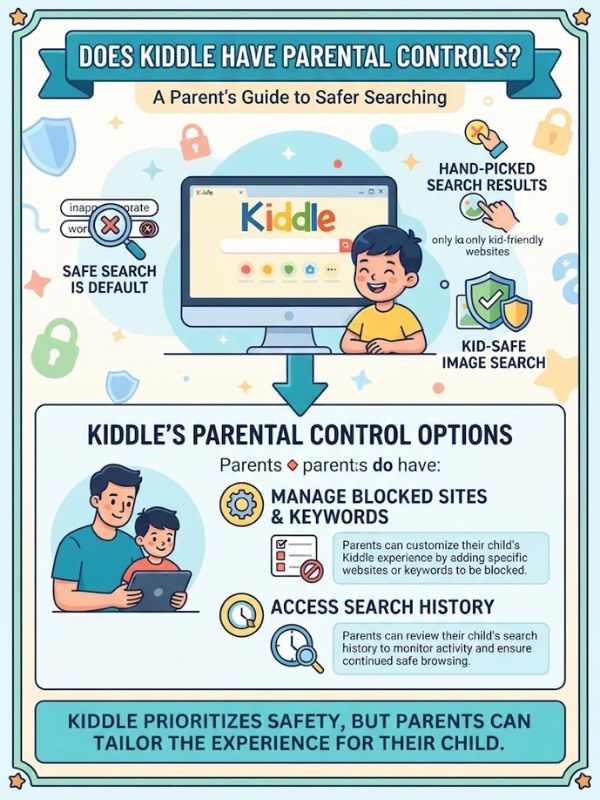
The filters work for every user in the same way. Parents cannot make them stricter or looser. The good news is that you can add your own controls. Your phone, tablet, computer, and home network all offer tools. You can combine them with Kiddle to build a safer setup. The next section shows you how.
How to Use Parental Controls on Kiddle
Since Kiddle has no controls of its own, you must set them up around it. Follow these simple steps.
Step 1: Set Kiddle as the home page. Open your child’s browser settings. Choose Kiddle as the start page. Your child will land on a safe search page every time.
Step 2: Bookmark Kiddle. Add it to the bookmarks bar. Remove other search engines from the bar. This makes Kiddle the easy choice.
Step 3: Use device controls. Every major system has free tools:
- Google Family Link: Manage Android devices and Chrome. Set screen time and approve apps.
- Apple Screen Time: Limit app use and block adult websites on iPhone and iPad.
- Windows Family Safety: Set time limits and web filters on a PC.
- Router controls: Many home routers can block adult sites for every device on your WiFi.
Step 4: Block other search engines. Use your device controls to limit access to other search sites. This keeps your child inside Kiddle.
Step 5: Turn on SafeSearch everywhere. Set SafeSearch on any other browser or search tool in your home. This adds a second layer.
Step 6: Sit with your child. Tools help, but you are the best filter. Watch how your child searches. Talk about what they find.
Here is a quick setup table:
| Tool | What It Does | Best For |
| Browser home page | Opens Kiddle first | All ages |
| Google Family Link | Time limits, app control | Android users |
| Apple Screen Time | Web and app limits | iPhone users |
| Router filter | Blocks adult sites at home | Whole family |
| Parent watching | Real time guidance | Ages 3 to 8 |
What Parents Have to Say About Kiddle
Parents share many views on Kiddle. Looking at common themes in parent reviews and online forums, a clear pattern shows up. Many parents love the simple look. They say big pictures help their kids stay focused. Young children enjoy the bright layout. It feels like a toy, not a tool.
Teachers often say the same thing. They like how fast students find kid level facts. They also say Kiddle saves time in the classroom.
Some parents raise concerns. A few say ads distract their kids. Others say the lower results sometimes include pages that are too hard to read. Some wish Kiddle had a parent dashboard.
Here is a summary of common feedback:
| What Parents Like | What Parents Dislike |
| Clean, colorful design | Ads on the page |
| Easy for young kids | No parental controls |
| No account needed | Uneven result quality |
| Free access | Limited for older kids |
The overall view is positive. Most parents see Kiddle as a good first search engine. They also agree it works best when adults stay involved.
Stay Safe With Findmykids
Safe search is only one part of child safety. Parents also want to know where their kids are. This is where Findmykids can help. Findmykids is a family safety app. It lets parents see a child’s location on a map. It works with the child’s phone or a kids smartwatch. Parents can check in at any time from their own phone.
Here are common features of apps like Findmykids:
- Live location: See where your child is right now.
- Location history: Review the places your child visited.
- Safe zones: Get alerts when your child arrives at or leaves home or school.
- SOS signal: Your child can send an alert in an emergency.
- Sound around: Some versions let parents listen to nearby sounds.
- Chat and calls: Kids can talk with trusted contacts through a smartwatch.
Kiddle protects your child online. Findmykids protects your child offline. Together, they cover both sides of modern childhood.
Always check the app’s current features and pricing before you decide. Choose a plan that fits your family. Then explain the app to your child in kind and simple words. A child who understands the reason for tracking feels safer, not watched.
Frequently Asked Questions
What is Kiddle used for?
Kiddle helps children search the web safely. It shows filtered results with large images and simple words.
Is Kiddle owned by Google?
No. Kiddle is independent. It uses Google Custom Search and SafeSearch technology to filter results.
Is Kiddle free to use?
Yes. Kiddle is free, and your child does not need an account.
Is Kiddle safe for a 7 year old?
Kiddle is a good choice for a 7 year old when a parent stays nearby. Filters help, but adult guidance keeps the experience safe.
Does Kiddle track my child?
Kiddle states that it does not collect personal information from users. Read its current privacy policy to confirm the latest details.
Can I set a screen time limit on Kiddle?
No. Kiddle has no built in time limits. Use tools like Google Family Link or Apple Screen Time instead.
What is a good alternative to Kiddle?
Other kid friendly search tools include KidzSearch and Swiggle. Compare their filters and layouts to find the best fit for your child.
Final Thoughts
Kiddle gives children a simple, colorful way to explore the web. Its big images, easy words, and strong filters make it a smart first search engine. It works best for kids between 5 and 12, with an adult close by.
No tool can replace a caring parent. Pair Kiddle with device controls, open talks, and clear family rules. Add a tool like Findmykids for safety outside the screen. With the right mix, your child can learn, play, and grow with confidence.